Task 01: Deploy demo user accounts with RBAC
-
On the lab VM’s taskbar, open Windows PowerShell ISE.
-
Save your Azure tenant’s domain in a notepad for later use (that is, contoso.com or contoso.onmicrosoft.com):
This value will be used through the lab instructions and scripts.
-
Select File > New.
-
In the top pane, enter the following script, but do not run it. The domain you entered above will be used to set up the various user accounts.
Select Copy on the code block, then paste with Ctrl+V. Do not select Type.
# ======================= # prerequisites-users.ps1 # Run as Global Admin # ======================= Import-Module Microsoft.Graph.Users Import-Module Microsoft.Graph.Identity.DirectoryManagement Connect-MgGraph -Scopes "User.ReadWrite.All", "Directory.ReadWrite.All", "RoleManagement.ReadWrite.Directory", "Organization.Read.All" # Helper: list available SKUs in your tenant Get-MgSubscribedSku | Select SkuId, SkuPartNumber, ConsumedUnits -First 200 # Replace with your tenant's actual SkuIds $license = "REPLACE VALUE" # Demo users definition $users = @( @{upn = "ciso@@lab.Variable(userDomain)"; display = "CISO Contoso"; pwd = "P@ssw0rd!2025"; roles = @("Global Reader") ; licenses = @() }, @{upn = "arch1@@lab.Variable(userDomain)"; display = "Sec Architect One"; pwd = "P@ssw0rd!2025"; roles = @("Security Administrator", "Exchange Administrator"); licenses = @() }, @{upn = "eng1@@lab.Variable(userDomain)"; display = "Sec Engineer One"; pwd = "P@ssw0rd!2025"; roles = @("Security Administrator", "Intune Administrator") ; licenses = @() }, @{upn = "admin1@@lab.Variable(userDomain)"; display = "Sec Admin One"; pwd = "P@ssw0rd!2025"; roles = @("Security Operator", "Exchange Administrator") ; licenses = @() }, @{upn = "soclead@@lab.Variable(userDomain)"; display = "SOC Lead"; pwd = "P@ssw0rd!2025"; roles = @("Security Operator", "Security Reader") ; licenses = @() }, @{upn = "analyst1@@lab.Variable(userDomain)"; display = "SOC Analyst One"; pwd = "P@ssw0rd!2025"; roles = @("Security Reader") ; licenses = @() }, @{upn = "user1@@lab.Variable(userDomain)"; display = "Lab User One"; pwd = "P@ssw0rd!2025"; roles = @() ; licenses = @($license) }, @{upn = "user2@@lab.Variable(userDomain)"; display = "Lab User Two"; pwd = "P@ssw0rd!2025"; roles = @() ; licenses = @($license) } ) # ----------------------------- # Enable roles if not present # ----------------------------- $allRoles = Get-MgDirectoryRole | Select-Object DisplayName, Id if (-not $allRoles) { $templates = Get-MgDirectoryRoleTemplate foreach ($t in $templates) { try { Enable-MgDirectoryRole -DirectoryRoleTemplateId $t.Id | Out-Null } catch {} } $allRoles = Get-MgDirectoryRole | Select-Object DisplayName, Id } # ----------------------------- # Helper functions # ----------------------------- function Ensure-User { param($upn, $display, $pwd) $u = Get-MgUser -Filter "userPrincipalName eq '$upn'" -ErrorAction SilentlyContinue if (-not $u) { New-MgUser -AccountEnabled:$true -DisplayName $display -MailNickname ($upn.Split("@")[0]) ` -PasswordProfile @{ Password = $pwd; ForceChangePasswordNextSignIn = $false } ` -UserPrincipalName $upn | Out-Null } } function Assign-Roles { param($upn, $roles) if (-not $roles) { return } $user = Get-MgUser -Filter "userPrincipalName eq '$upn'" foreach ($r in $roles) { $role = $allRoles | Where-Object { $_.DisplayName -eq $r } if ($role) { try { New-MgDirectoryRoleMemberByRef ` -DirectoryRoleId $role.Id ` -OdataId "https://graph.microsoft.com/v1.0/directoryObjects/$($user.Id)" ` -ErrorAction SilentlyContinue | Out-Null } catch {} } } } function Assign-Licenses { param($upn, $skus) if (-not $skus) { return } $user = Get-MgUser -Filter "userPrincipalName eq '$upn'" $adds = @() foreach ($s in $skus) { if ($s -and $s -ne "<GUID>") { $adds += @{SkuId = $s } } } # Ensure usage location before licensing if (-not $user.UsageLocation) { Update-MgUser -UserId $user.Id -UsageLocation "US" $user = Get-MgUser -Filter "userPrincipalName eq '$upn'" # refresh } if ($adds.Count -gt 0) { Set-MgUserLicense -UserId $user.Id -AddLicenses $adds -RemoveLicenses @() | Out-Null } } # ----------------------------- # Main Execution # ----------------------------- foreach ($u in $users) { Ensure-User -upn $u.upn -display $u.display -pwd $u.pwd Assign-Roles -upn $u.upn -roles $u.roles Assign-Licenses -upn $u.upn -skus $u.licenses } Write-Host "Users, roles, and licenses processed." Disconnect-MgGraph Disconnect-ExchangeOnline -Confirm:$false -
Highlight lines 1-10, then select Run Selection (
 ) from the top bar.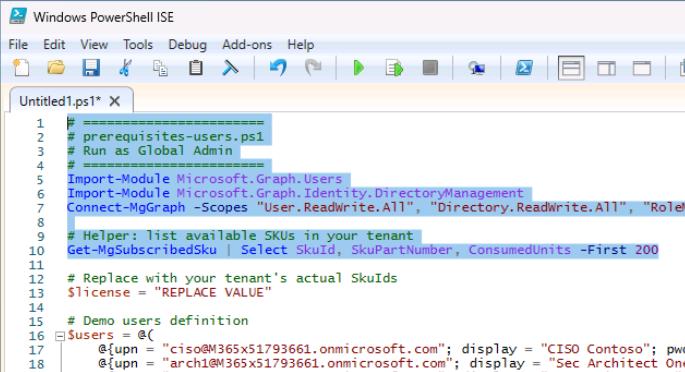
-
Sign in with your global admin account.
-
On the Permissions requested dialog, select Consent on behalf of your organization, then select Accept.
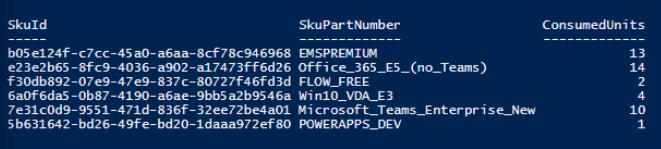
The bottom console pane will display your tenant’s licenses and SkuId.
-
Copy the SkuId for any one of these SkuPartNumbers, if you have at least two (2) available:
- SPE_E5 (Microsoft 365 E5)
- ENTERPRISEPREMIUM (Office 365 E5)
- Office_365E5(no_Teams)
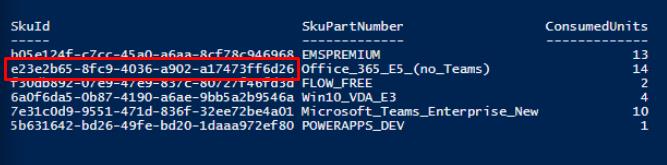
-
On line 13, replace the value between the quotes with the SkuId.
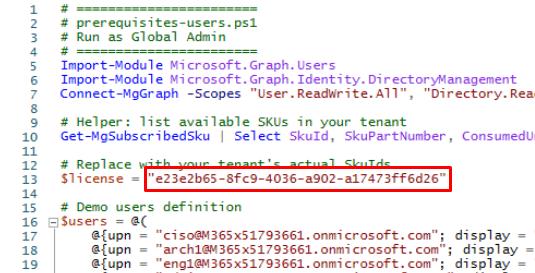
If you’re unable to license, delete the value between the quotes.
-
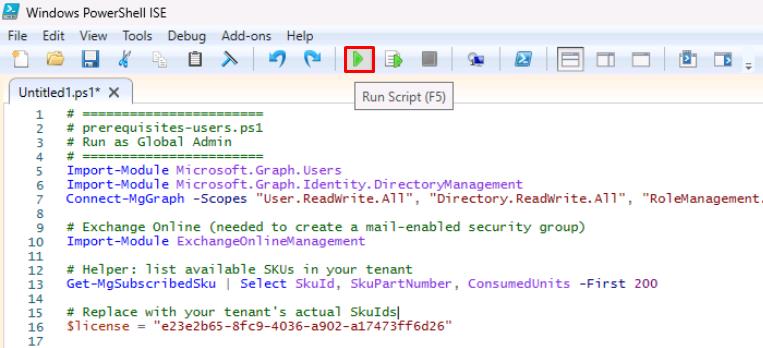
On the top bar, select Run Script (
 ).
).
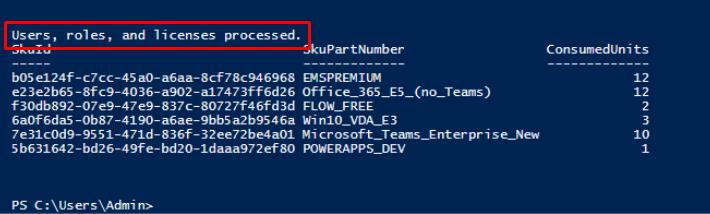
This will create user accounts and set various admin roles: ciso, arch1, eng1, admin1, soclead, analyst1, user1, user2.