Task 03: Endpoint isolate and collect triage bundle
Security Architecture Team
-
Approve device isolation on the Windows VM.
Used when lateral movement or credential theft is suspected.
-
For lab purposes, the Engineer should limit isolation approval to the Windows VM only.
In real-world scenarios, document the approval of the VMs list for isolation.
Security Engineering and Administration
-
Open Edge to your security.microsoft.com tab.
-
In the leftmost pane, go to Assets > Devices.
-
Select the text for winvm-mde to open the device page.
-
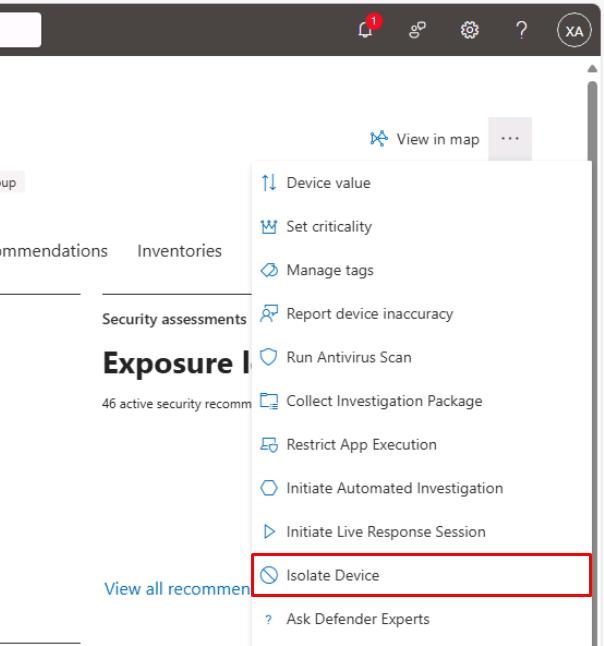
In the upper-right corner of the page, select the ellipsis, then select Isolate Device.
-
In the dialog, select the checkbox for Allow Outlook, Teams and Skype….
-
Under Comment, enter
Isolate Device, then select Confirm.If you shut down winvm-mde, it will need to be started for this to complete.
-
Close the flyout pane.
SOC Analyst
-
In your regular Microsoft Edge window, go back to the Defender XDR portal tab.
-
In the leftmost pane, go to Investigation & response > Actions & submissions > Action center.
-
Select the History tab to see the Isolate device action type.