Task 05: Daily hunting review (simulated dataset)
Security Architecture Team
-
Define review scope:
- Time window: past 24 hours of logons.
- Focus: RemoteInteractive logons, multi-location use, after-hours access.
- Deliverables:
- Daily hunting query results (CSV).
- Summary of anomalies and actions.
- Schedule: 09:00am daily.
- Owner: SOC Duty Analyst.
-
Update the runbook accordingly.
Security Engineering and Administration
-
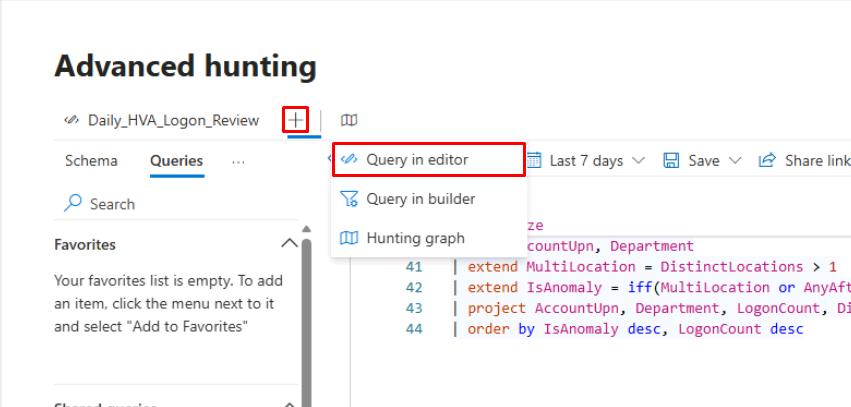
On the bar above the query pane, select the +, then select Query in editor to create a new query.
-
Run the following baseline query:
 // Step 2a: Re-create synthetic data
 let HighValueAssets = datatable(AccountUpn:string, Department:string)
 [
     "ceo@zavaoil.com","Executive",
     "ciso@zavaoil.com","Security",
     "adminsvc@zavaoil.com","IT",
     "finlead@zavaoil.com","Finance",
     "itops@zavaoil.com","Operations"
 ];
 let SimulatedDeviceLogons = datatable(AccountUpn:string, DeviceName:string, LogonTime:datetime, Location:string, LogonType:string)
 [
     "ceo@zavaoil.com","CEO-LAPTOP",datetime(2025-11-02 08:05:00),"Wellington","RemoteInteractive",
     "ciso@zavaoil.com","CISO-LAPTOP",datetime(2025-11-02 08:10:00),"Wellington","RemoteInteractive",
     "adminsvc@zavaoil.com","SRV-AD01",datetime(2025-11-02 09:00:00),"Auckland","ServiceLogon",
     "finlead@zavaoil.com","FIN-LAPTOP01",datetime(2025-11-02 09:05:00),"Sydney","RemoteInteractive",
     "itops@zavaoil.com","IT-LAPTOP01",datetime(2025-11-02 09:10:00),"Wellington","Interactive",
     "ceo@zavaoil.com","CEO-LAPTOP",datetime(2025-11-02 23:45:00),"Singapore","RemoteInteractive",
     "finlead@zavaoil.com","FIN-LAPTOP01",datetime(2025-11-02 23:50:00),"Singapore","RemoteInteractive"
 ];
 // Step 2b: Aggregate and flag anomalies
 HighValueAssets
 | join kind=inner (SimulatedDeviceLogons) on AccountUpn
 | extend HourOfDay = datetime_part("hour", LogonTime)
 | extend AfterHours = iif(HourOfDay < 6 or HourOfDay > 20, true, false)
 | summarize
     LogonCount = count(),
     DistinctDevices = dcount(DeviceName),
     DistinctLocations = dcount(Location),
     Locations = make_set(Location,5),
     FirstSeen = min(LogonTime),
     LastSeen  = max(LogonTime),
     AfterHoursFlag = any(AfterHours)
   by AccountUpn, Department
 | extend MultiLocation = DistinctLocations > 1
 | extend IsAnomaly = iif(MultiLocation or AfterHoursFlag, "YES", "NO")
 | project AccountUpn, Department, LogonCount, Locations, MultiLocation, AfterHoursFlag, IsAnomaly, FirstSeen, LastSeen
 | order by IsAnomaly desc, LogonCount desc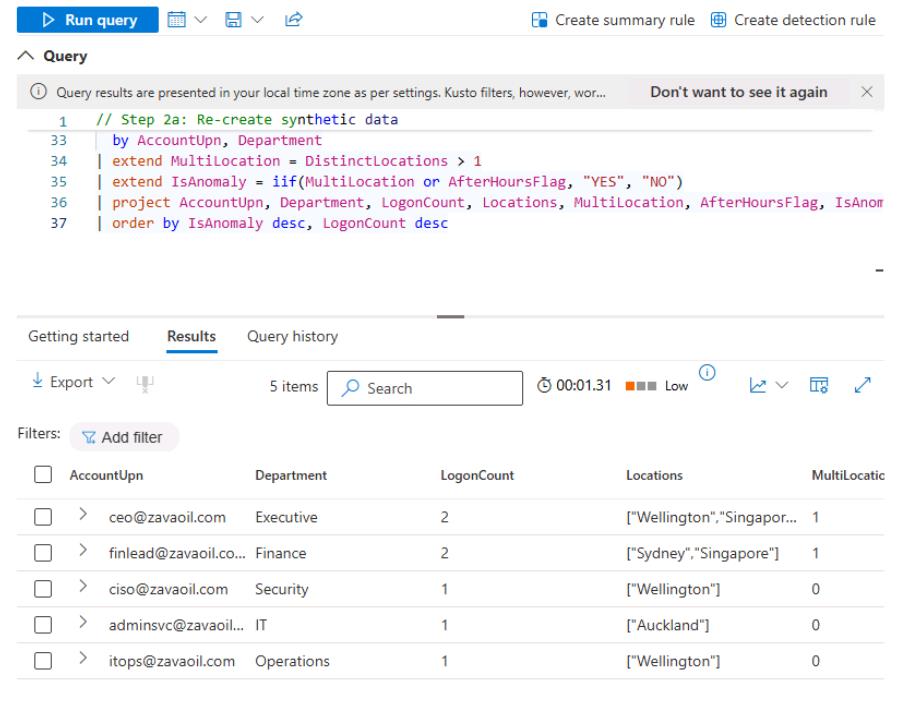
-
Save the query:
-
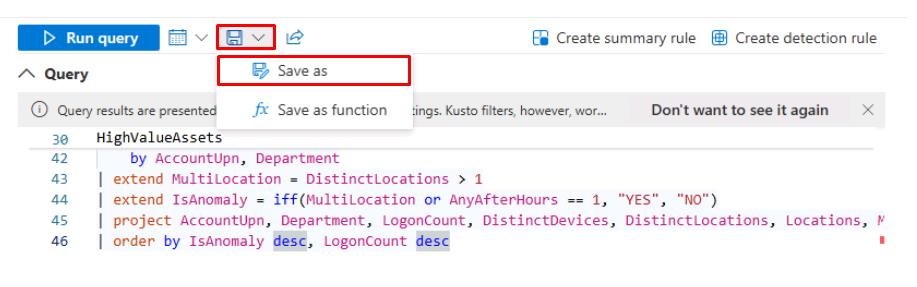
At the top of the Query pane, select the Save icon, then select Save as.
-
In the flyout pane, for Name, enter
Hunting_HVA_Logon_Review. -
Keep the default Location, then select Save.
You can do something to automate this through the Advanced Hunting API to query daily at 09:00am, then export a CSV to a location, like SOC/Hunting/Daily.
Alternatively, schedule a Power Automate flow to trigger a query and post a summary to Teams.
Tag exports by date (HVA_Hunting_YYYYMMDD.csv).
-
SOC Analyst
-
In the leftmost pane, go to Investigate & response > Hunting > Advanced hunting.
-
The Daily_HVA_Logon_Review query should still be loaded. Select Run query.
-
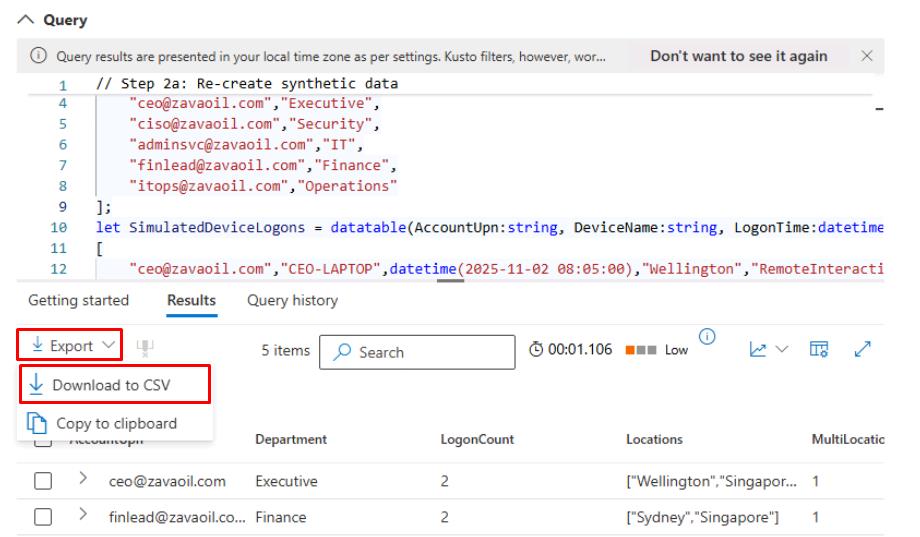
In the upper-left corner of the Results, select Export > Download to CSV.
-
From here, you could:
- In Excel or Power BI, create visualizations:
- Bar chart of LogonCount by AccountUpn.
- Pie chart of IsAnomaly.
- Document each YES case:
- Add a note to the incident in the portal (“Observed after-hours logon in Singapore”).
- Verify against expected travel schedules or remote policies.
- Present summary in daily SOC meeting:
- “2 HVAs showed after-hours remote logons from Singapore - verified as expected travel.”
- In Excel or Power BI, create visualizations: