Task 02: One-click mail purge runbook (native compliance search)
Security Architecture Team
-
The Architect would approve purge criteria. For example:
- Subject contains: ‘PAYROLL UPDATE - ACTION REQUIRED’
- Time window: last 24 hours
Security Engineering and Administration
The following script performs an approved purge of malicious or unwanted messages directly from Exchange Online mailboxes by leveraging the Compliance Search and Compliance Search Action cmdlets. These are part of Microsoft 365 Defender’s eDiscovery / Purview Compliance layer.
-
Close your PowerShell ISE window without saving.
-
In the VM taskbar’s search box, enter
Windows PowerShell. -
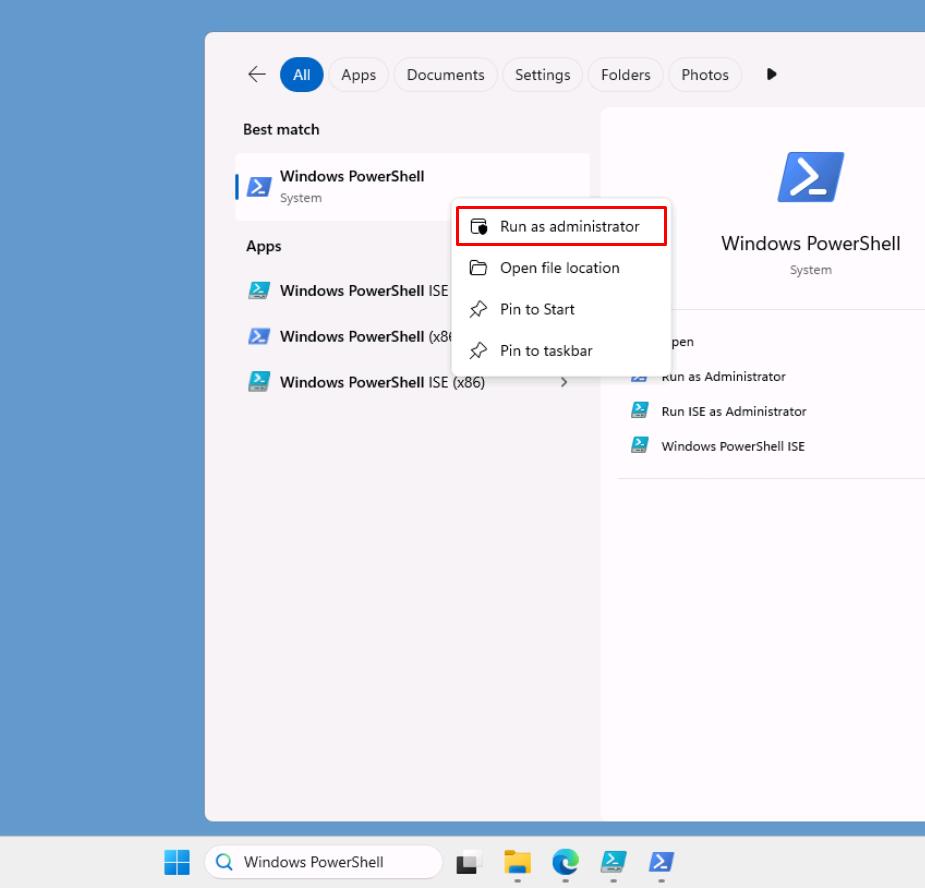
Right-click Windows PowerShell > Run as administrator.
-
In the User Account Control dialog, select Yes.
-
In the elevated PowerShell window, enter the following:
Install-Module ExchangeOnlineManagement -RequiredVersion 3.9.0 -Force
Earlier usage of the module required an older version due to a current bug with authentication using Connect-ExchangeOnline in 3.9.0.
The following script requires 3.9.0 for the Connect-IPPSSession cmdlet.
-
Once installed, reopen PowerShell ISE.
-
In the top pane, enter the following, then replace the value of $TenantUPN with your global admin account.
<# ================================================== Compliance Search + Purge (SoftDelete/HardDelete) Tested with ExchangeOnlineManagement 3.9.x+ ================================================== #> $ErrorActionPreference = 'Stop' # ---------------- CONFIG ---------------- $TenantUPN = "REPLACE WITH YOUR LICENSED GLOBAL ADMIN ACCOUNT" $DelegatedOrganization = "@lab.Variable(userDomain)" $SearchName = "Purge_Test" $Mailbox = "user1@@lab.Variable(userDomain)" $SubjectToMatch = 'PAYROLL UPDATE - ACTION REQUIRED' # exact subject text $TimeZoneId = "New Zealand Standard Time" # Auckland $LookbackDays = 30 # change to 1 for last 24h $PurgeType = "SoftDelete" # or "HardDelete" $SearchTimeoutSec = 900 # 15 min $ActionTimeoutSec = 900 # 15 min $UseAllMailboxesFallback = $false # set $true if initial search returns 0 # --------------------------------------- Write-Host "== Purge Workflow for '$SearchName' ==" -ForegroundColor Cyan function Ensure-EXOModule { $mod = Get-Module ExchangeOnlineManagement -ListAvailable | Sort-Object Version -Descending | Select-Object -First 1 if (-not $mod -or $mod.Version -lt [version]'3.9.0') { Write-Host "Installing/Updating ExchangeOnlineManagement (need >= 3.9.0)..." -ForegroundColor Yellow Install-Module ExchangeOnlineManagement -Force } Import-Module ExchangeOnlineManagement -ErrorAction Stop $loaded = (Get-Module ExchangeOnlineManagement).Version Write-Host "ExchangeOnlineManagement loaded: $loaded" -ForegroundColor Green } function Connect-Compliance { Write-Host "Resetting any existing EXO/IPP sessions..." -ForegroundColor Yellow try { Disconnect-ExchangeOnline -Confirm:$false -Purge 2>$null } catch {} Get-PSSession | Remove-PSSession -ErrorAction SilentlyContinue Import-Module ExchangeOnlineManagement -ErrorAction Stop Write-Host "Connecting with Search-Only session to $DelegatedOrganization ..." -ForegroundColor Yellow Connect-IPPSSession -EnableSearchOnlySession ` -UserPrincipalName $TenantUPN ` -DelegatedOrganization $DelegatedOrganization ` -DisableWAM ` -ShowBanner:$false Write-Host "Connected to Microsoft Purview (Compliance PowerShell)." -ForegroundColor Green } function Get-LocalWindow { param([string]$TzId, [int]$Days) $tz = [System.TimeZoneInfo]::FindSystemTimeZoneById($TzId) $nowLocal = [System.TimeZoneInfo]::ConvertTime([DateTime]::UtcNow, $tz) $from = $nowLocal.AddDays(-1 * [Math]::Abs($Days)).Date.ToString("yyyy-MM-dd") $to = $nowLocal.Date.AddDays(1).ToString("yyyy-MM-dd") # make 'to' exclusive next-day midnight return @{ From = $from; To = $to } } function Remove-OldSearch { param([string]$Name) $existing = Get-ComplianceSearch -Identity $Name -ErrorAction SilentlyContinue if ($existing) { Write-Host "Cleaning existing search '$Name'..." -ForegroundColor Yellow if ($existing.Status -in @('Starting', 'Running', 'Stopping')) { try { Stop-ComplianceSearch -Identity $Name -Confirm:$false -ErrorAction Stop } catch {} Start-Sleep 5 } $actions = Get-ComplianceSearchAction -ErrorAction SilentlyContinue | Where-Object { $_.SearchName -eq $Name } foreach ($a in $actions) { try { Remove-ComplianceSearchAction -Identity $a.Identity -Confirm:$false -ErrorAction Stop } catch {} } try { Remove-ComplianceSearch -Identity $Name -Confirm:$false -ErrorAction Stop } catch {} } } function Wait-Search { param([string]$Name, [int]$TimeoutSeconds) $start = Get-Date while ($true) { $s = Get-ComplianceSearch -Identity $Name -ErrorAction Stop Write-Host ("Search Status: {0} Items: {1} {2}%" -f $s.Status, $s.Items, $s.PercentComplete) if ($s.Status -eq 'Completed') { return $true } if ($s.Status -in @('Failed', 'PartiallySucceeded')) { Write-Warning "Search finished with status: $($s.Status)" return $false } if ((Get-Date) - $start -gt [TimeSpan]::FromSeconds($TimeoutSeconds)) { throw "Timeout waiting for search '$Name' to finish." } Start-Sleep 5 } } function Wait-Action { param([string]$Name, [int]$TimeoutSeconds) $start = Get-Date while ($true) { $a = Get-ComplianceSearchAction -ErrorAction SilentlyContinue | Where-Object { $_.SearchName -eq $Name } | Sort-Object CreationTime -Descending | Select-Object -First 1 if ($a) { Write-Host ("Action: {0} Status: {1}" -f $a.Action, $a.Status) if ($a.Status -in @('Completed', 'Failed', 'PartiallySucceeded')) { return $a } } if ((Get-Date) - $start -gt [TimeSpan]::FromSeconds($TimeoutSeconds)) { throw "Timeout waiting for purge action on '$Name'." } Start-Sleep 5 } } function Invoke-PurgeAction { param([string]$Name, [string]$Type) $hasPurgeParam = (Get-Command New-ComplianceSearchAction -ErrorAction Stop).Parameters.ContainsKey('Purge') if ($hasPurgeParam) { Write-Host "Submitting purge using: -Purge -PurgeType $Type" -ForegroundColor Yellow New-ComplianceSearchAction -SearchName $Name -Purge -PurgeType $Type -Confirm:$false } else { Write-Host "Submitting purge using: -PurgeType $Type (session without -Purge switch)" -ForegroundColor Yellow New-ComplianceSearchAction -SearchName $Name -PurgeType $Type -Confirm:$false } } try { Ensure-EXOModule Connect-Compliance $win = Get-LocalWindow -TzId $TimeZoneId -Days $LookbackDays # Build a precise, index-friendly query: # - Exact subject phrase in quotes # - Limit to email items # - Received in local NZ window [From, To) $SubjectExact = '"' + $SubjectToMatch + '"' # ensure quoted $DateClause = "(received>=" + $win.From + " AND received<" + $win.To + ")" $Query = "kind:email AND subject:$SubjectExact AND $DateClause" Write-Host "Query: $Query" -ForegroundColor Cyan # Clean slate Remove-OldSearch -Name $SearchName # Create & run search if ($UseAllMailboxesFallback) { New-ComplianceSearch -Name $SearchName -ExchangeLocation All -ContentMatchQuery $Query -ErrorAction Stop } else { New-ComplianceSearch -Name $SearchName -ExchangeLocation $Mailbox -ContentMatchQuery $Query -ErrorAction Stop } Start-ComplianceSearch -Identity $SearchName -ErrorAction Stop $ok = Wait-Search -Name $SearchName -TimeoutSeconds $SearchTimeoutSec if (-not $ok) { throw "Compliance search did not complete successfully." } # Show summary $sum = Get-ComplianceSearch -Identity $SearchName $sum | Format-List Name, Status, Items, PercentComplete, CreatedBy if ($sum.Items -eq 0 -and -not $UseAllMailboxesFallback) { Write-Warning "No items found in $Mailbox. Tip: set `$UseAllMailboxesFallback = `$true to sanity-check against All mailboxes." return } # Purge Invoke-PurgeAction -Name $SearchName -Type $PurgeType # Wait for action and print result $result = Wait-Action -Name $SearchName -TimeoutSeconds $ActionTimeoutSec $result | Format-List Identity, Action, Status, ResultItemsCount, CreationTime, Workload } catch { Write-Error $_.Exception.Message } -
On the top bar, select Run Script.
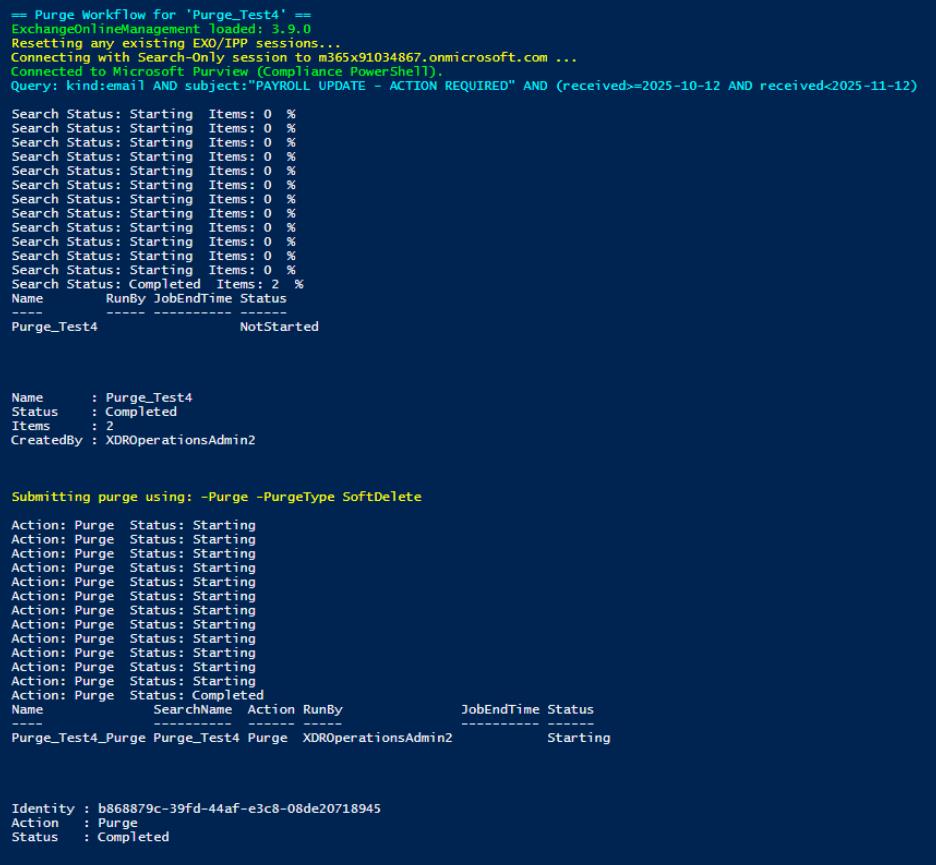
Runs a full Compliance Search-and-Purge workflow that builds a precise subject/date query, executes the search, and then performs a SoftDelete or HardDelete purge on matching messages with safety checks and timeouts.
Observe the $PurgeType variable is set to SoftDelete. This is being used by the New-ComplianceSearchAction cmdlet and sends the emails to the Deleted Items folder. Items are recoverable by users until the deleted item retention period expires.
By setting this to HardDelete, purged items are marked for permanent removal from the mailbox instead.
SOC Analyst
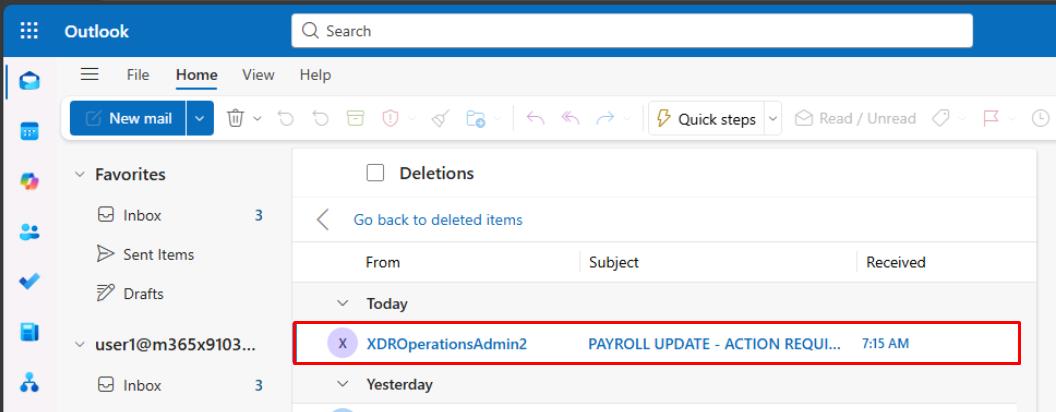
This task shows what the end user would see, following a SoftDelete purge.
-
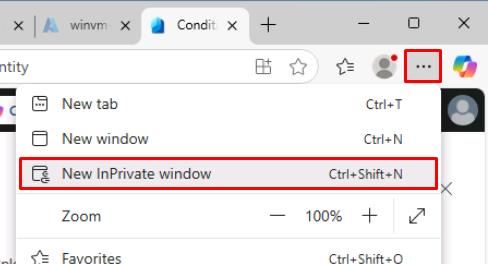
In the upper-right corner of Microsoft Edge, select the ellipsis, then select New InPrivate window.
-
Go to
outlook.office.com. -
Sign in with Lab User One:
Item Value Username user1@@lab.Variable(userDomain)Password P@ssw0rd!2025 -
In the Outlook menu, select Deleted Items.
-
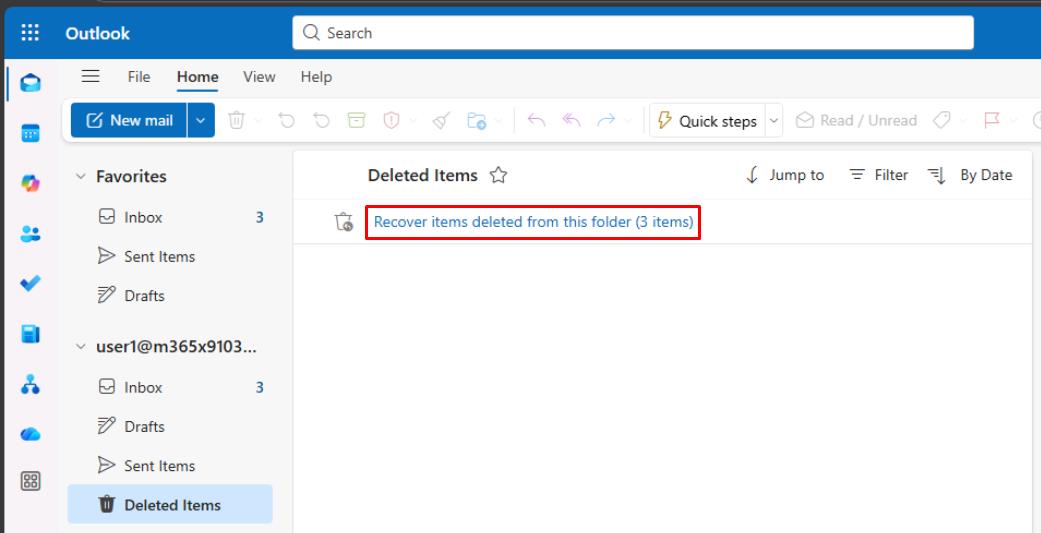
Select Recover items deleted from this folder.
-
Observe how the email was purged by Engineering for ‘PAYROLL UPDATE - ACTION REQUIRED’, using the SoftDelete purge type.
-
Close the InPrivate window.